Master Purchase Order Detail Description
This is part of the Purchasing Add-on Module
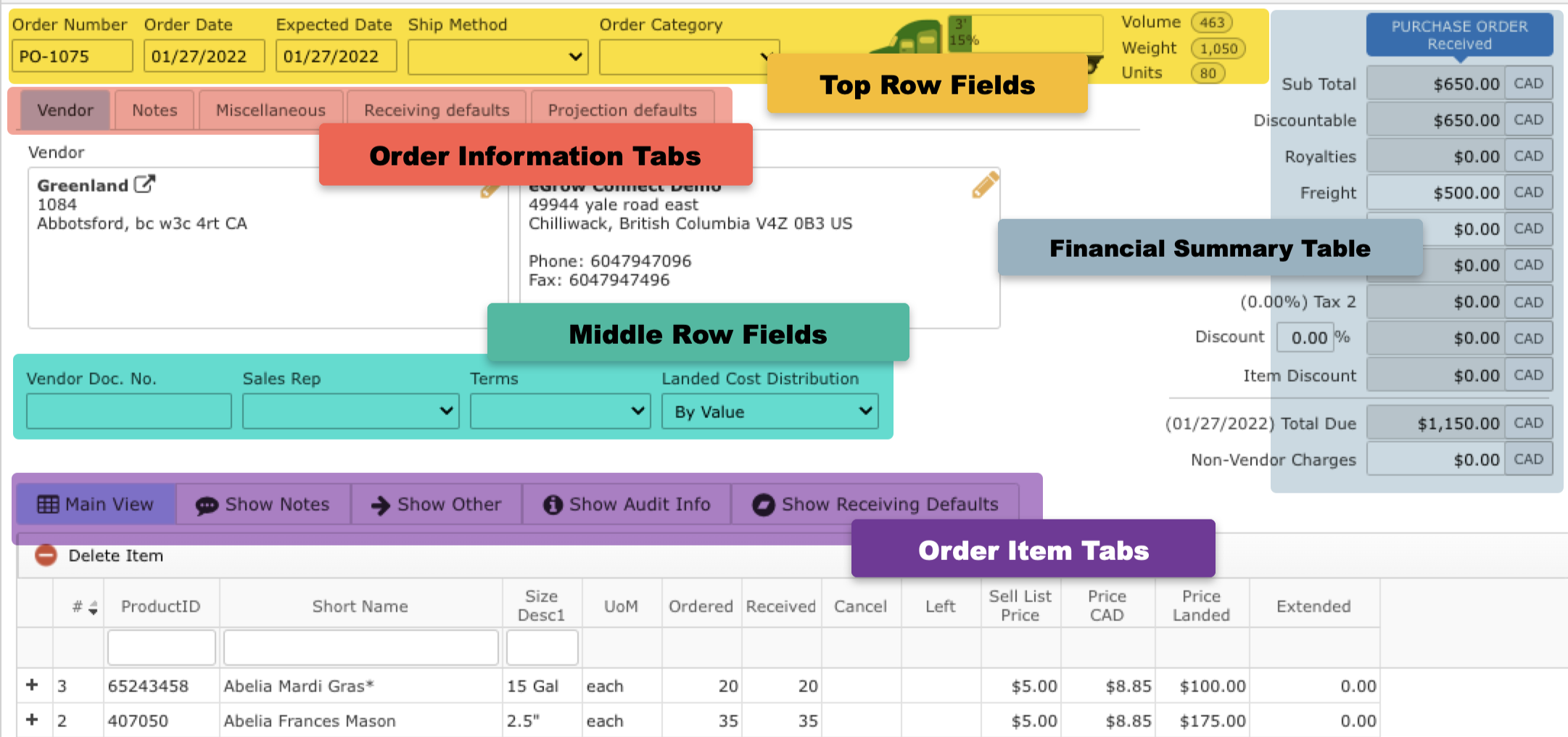
Top Row Fields
- Order Number: An eGrow Connect generated purchase order number
- Order Date: Date order was placed (editable)
- Expected Date: Date items will be shipped (editable)
- Ship Method: Selected shipping method, options can be edited in system setup
- Order Category: Selected order category, options can be edited in system setup
- Truck Icon: Visual display of how much space the order will take up on a truck according to the eGrow Connect load calculations
Financial Summary Table
A financial summary of the entire order.
- Sub total: Combined sell cost of all items on the order
- Discountable: Combined cost of all the items on the order which have ‘yes’ marked in the “Disc y/n” column.
- Royalties: Combined cost for all plant royalties
- Freight: Enter a dollar amount for the cost of shipping.
- Other: Enter any other costs associated with the order.
- Tax 1 and Tax 2: Tax percentages to be added to the total, determined by the tax scheme.
- Discount: If checked, the percentage entered in the % field will be applied to the amount in the “Discountable” field above.
- Item Discount: Combined discount amount for all itemized discounts, created in the “Disc %” column for each item on the order
- Total Due: Total amount due on the order. The Expected Date is also the due date for the order.
Order Information Tab
Vendor and Deliver to: Addresses for vendor and delivery, adjust default addresses in Vendor module, click symbol to edit. External and Internal notes that apply to the entire sales order. Internal notes will not appear on printed sales order reports. Learn more about purchase order notes. Tax Scheme: Select a tax scheme for the order, adjust tax schemes in System Setup Exchange Rate: Multi-Currency Add-on Module Select a currency option to use for the order. Information entered here will be used as the default for purchased items when using the Example Scenario: A grower is planning to add items from two or more purchase orders from different vendors onto sales orders using |
 Add to Projections function in the taskbar.
Middle Row Fields
Most of these fields will autofill with default information from the Vendor module.
- Vendor Doc No.: A number for the order supplied by the vendor.
- Sales Rep: The vendor employee that handled the sale. You can add sales rep information by adding them to the Contacts tab in Vendors.
- Terms: Terms of the sale, payment terms can be created/adjusted in System Setup
Order Items Tabs
A place to write notes about individual items on this order.
Enter line item information about each item.
|